
Save any URL
Keep useful sites, dashboards, articles, and repositories with their titles and site icons.
BookmarkNa brings links, notes, and code snippets into one private workspace that stays organized and easy to search.
Free during beta · No credit card required
Dashboard
Organized, searchable, and close at hand.
Launch checklist
Pinned note · 7 tasks
API response helpers
TypeScript · code snippet
Design inspiration
12 links · 4 tags
Meeting notes
Updated today
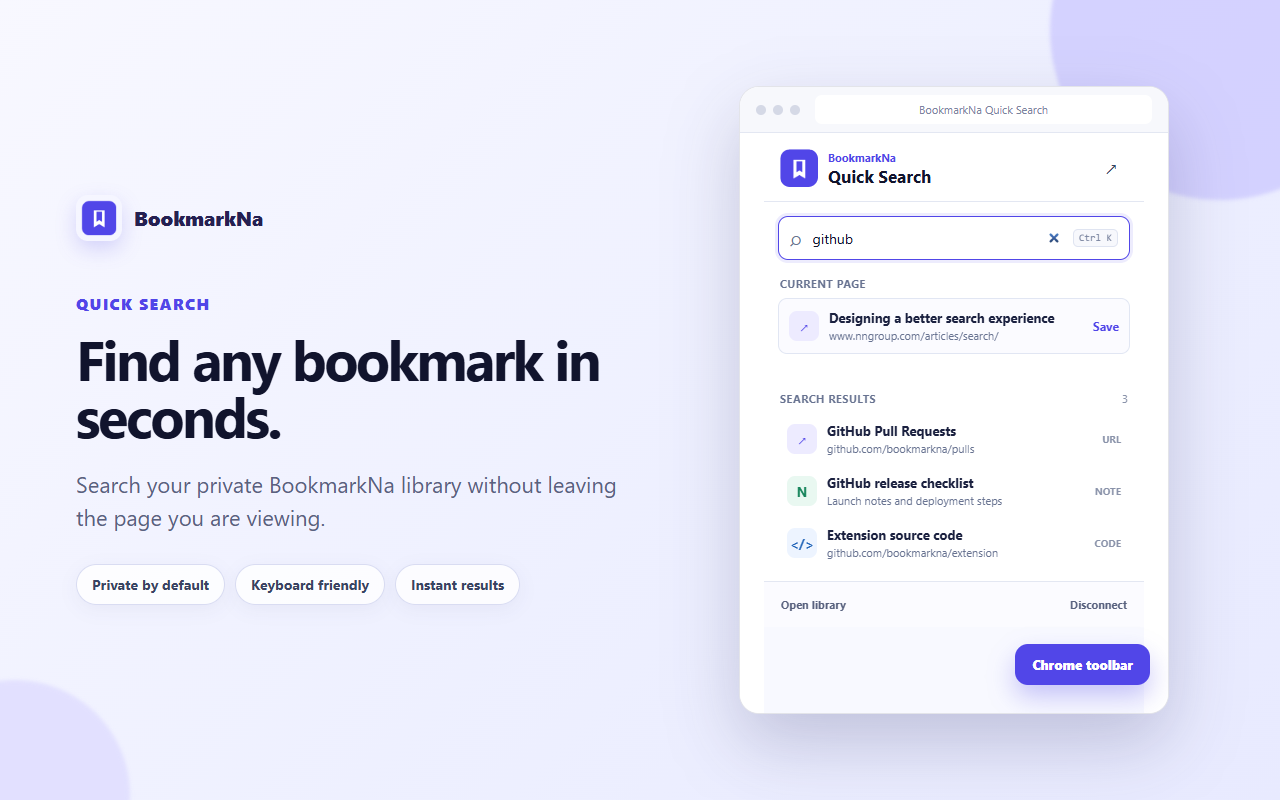
Search your private BookmarkNa library and capture the page you are viewing without breaking your flow.
Private search connects only to BookmarkNa. The extension does not read your browsing history.
Everything in its place
Capture the context around every resource, then find it again without remembering where you put it.
Keep useful sites, dashboards, articles, and repositories with their titles and site icons.
Capture ideas with formatting, checklists, images, and strikethrough—all without leaving your workspace.
Store commands and reusable snippets beside the documentation and projects they belong to.
Build nested folders that match your projects, clients, interests, or working style.
Use flexible tags to group related resources across different folders and formats.
Search across titles, URLs, descriptions, notes, code, folders, and tags from one place.
New to organizing links online? Learn how a bookmark web app keeps useful resources searchable across browsers and devices.
See collections and categories as clear columns, then move bookmarks and reorder your workspace without losing context.
Category colors and bookmark counts make busy libraries easier to scan.
Drag bookmarks into a useful order or move them between category columns.
The board works with the collections and categories already in your library.
All Collections
42 bookmarks
Plan reminders, notes, and bookmark follow-ups beside the resources that inspired them. Switch between day, week, and month views as your schedule changes.
Drag an event to another date, or open its details to edit the time, location, notes, and linked bookmark.
Attach a saved URL, note, or code snippet so the context is ready when the reminder arrives.
Choose event colors, add an optional venue, and keep busy days readable with compact summaries.
Read launch notes
Workspace review · 4:30 PM

Ask Tandi
Your saved knowledge can answer back.
Your saved research points to three resources that cover the message, release checklist, and Chrome launch plan.
Tandi finds, summarizes, and connects the knowledge already saved in your private BookmarkNa library—with source bookmarks included in the answer.
Find recent research, compare saved ideas, or rediscover resources you have not opened yet.
Tandi keeps the relevant bookmarks attached so you can inspect the original material.
Simple questions stay local; deeper synthesis can use Tandi’s AI service.
About BookmarkNa
Useful links, notes, and snippets often end up scattered across browser folders, separate apps, and old conversations. BookmarkNa gives them one searchable home, so what you save stays easy to find and ready to use.
Organize your library with folders and tags, keep important resources close with favorites and pins, and ask Tandi to help you reconnect with the knowledge you have collected.
Import should be straightforward, export should always be available, and leaving should never feel risky.
A personal knowledge workspace should protect your resources and keep access under your control.
Every feature should make saving or retrieving easier—not add process for its own sake.
Simple pricing
BookmarkNa is free during beta. Explore the complete workflow and help shape what comes next.
$0
For people ready to bring their saved resources into one calmer workspace.
Coming soon
For power users who want more storage, resilience, and advanced organization.
Your data stays portable
Import bookmarks from your browser, then export your BookmarkNa workspace as JSON, CSV, or browser-ready HTML whenever you need it.
Bring your existing browser folders along.
Your bookmarks remain yours to export.
Create a private workspace for the links, notes, and code you want to find later.
Start for free