Product update
Introducing BookmarkNa Quick Search for Chrome
Meet BookmarkNa Quick Search for Chrome: search your private bookmark library and save the current page without leaving your browser toolbar.
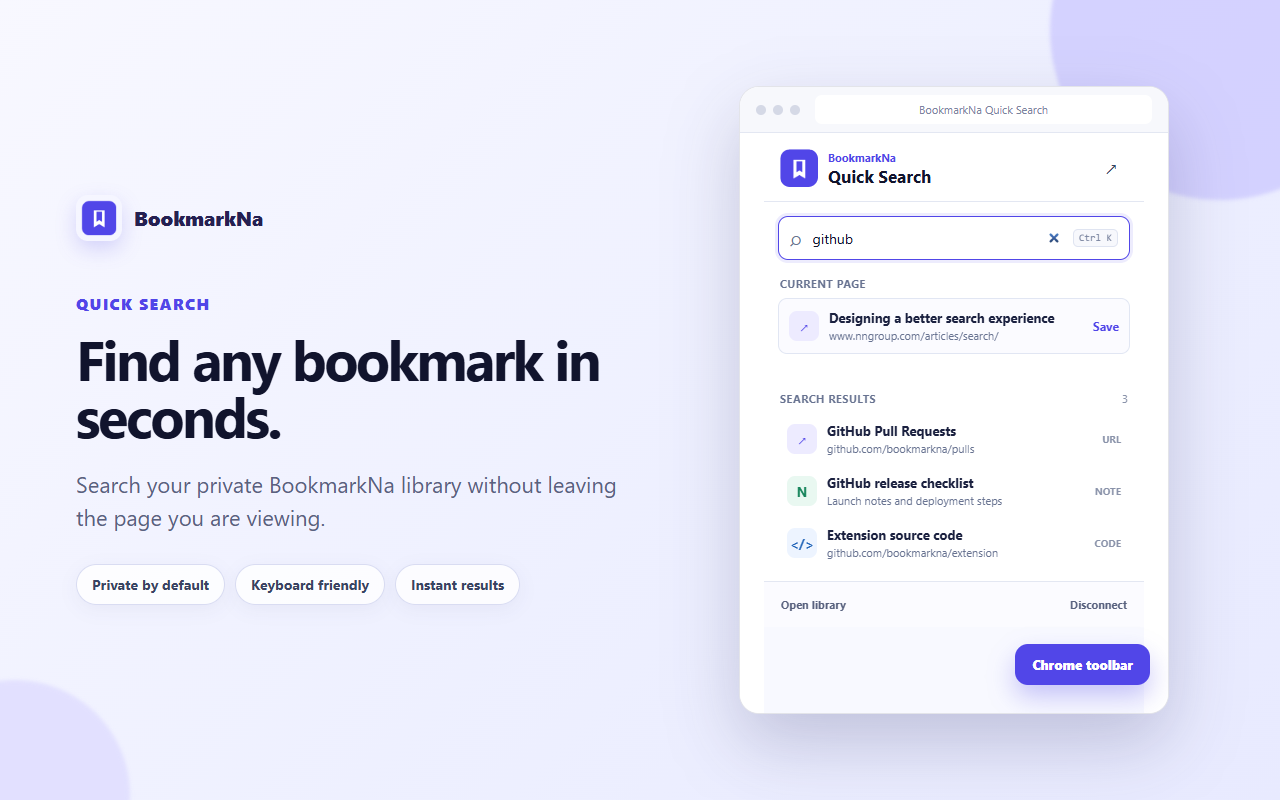
BookmarkNa started with a simple promise: anything worth saving should be easy to find again. Today we are bringing that promise closer to the page you are already using with BookmarkNa Quick Search for Chrome.
The extension now combines two everyday jobs in one compact toolbar popup. You can search your private BookmarkNa library when you need an existing resource, or send the current page to BookmarkNa when you find something new.
Search your library from the toolbar
Open the extension and start typing a title, URL, phrase from a note, or text from a saved code entry. Quick Search returns a focused list of matching bookmarks so you can move from memory to the right resource with fewer steps.
- URL results open the saved destination directly.
- Notes and code open BookmarkNa with the matching title ready in workspace search.
- Keyboard navigation lets you move through results with the arrow keys and open a selection with Enter.
When the search field is empty, the popup shows recent bookmarks instead. That makes it useful both when you know what to type and when you simply want to return to something you used recently.
Save the current page without losing context
The current tab appears directly below the search field. Choose Save and BookmarkNa opens a review form with the page title and URL already filled in. You can then add a description, folder, and tags before placing it in your workspace.
Saving remains deliberate
The extension prepares the bookmark but does not silently add every page you visit. You keep control over what enters your library and how it is organized.
Private search, connected only when you choose
Quick Search requires a BookmarkNa account because it searches your private library. The connection begins on a dedicated BookmarkNa page, where you explicitly authorize the installed extension. You can disconnect again from the popup at any time.
- The extension connects only to BookmarkNa for authentication and private search.
- Connection details are stored locally by Chrome so you do not have to reconnect every time.
- Access to the active tab is temporary and used to prepare its title and URL for saving.
- The extension does not request or read your browsing history.
Install and connect Quick Search
- Install BookmarkNa Quick Save from the Chrome Web Store.
- Pin the BookmarkNa icon to your Chrome toolbar.
- Open the extension and select Connect BookmarkNa.
- Sign in to BookmarkNa if prompted, then approve the connection.
- Return to the popup and start searching your library.
You can still use Save current page before connecting. BookmarkNa will ask you to sign in when the review form opens.
A faster bridge between browsing and retrieval
Quick Search is the first step toward making BookmarkNa useful at the moment you need a saved resource—not only after you open the full workspace. We will keep improving result relevance, capture speed, and the actions available after retrieval while keeping the popup focused.
If you use the extension, tell us which searches save you the most time and where the workflow still feels slow. That feedback will shape what we build next.
Put your library in the toolbar
Install BookmarkNa Quick Search for Chrome and find your saved resources without breaking your flow.
Add to Chrome